 togetherlink
GLM 5.2 in Codex CLI: Install, Launch, Verify
Keep the Codex interface and tools, but run the coding model on Together AI. This guide takes you from API key to a verified GLM 5.2 coding run.
By TogetherLink
- Model
- GLM 5.2
- Context window
- 262K tokens
- Protocol
- Responses
- Input
- Text
Install, authenticate, launch
Install TogetherLink
This installs the self-updating togetherlink binary on macOS or Linux and adds the tcodex shortcut used below. Codex CLI must also be installed; use the official Codex CLI setup if needed.
curl -fsSL https://togetherlink.vercel.app/install.sh | bashSave your Together API key
Run the configuration command and paste the Together API key you created. It stores the key locally so you do not paste it into every run. If it asks for an Exa key, press Enter to skip unless you want proxy-backed web search.
togetherlink configureStart Codex on GLM 5.2
Select GLM 5.2 explicitly because Kimi K3 is the current default. The model flag belongs before the Codex subcommand.
togetherlink --model zai-org/GLM-5.2 codexWhat success looks like
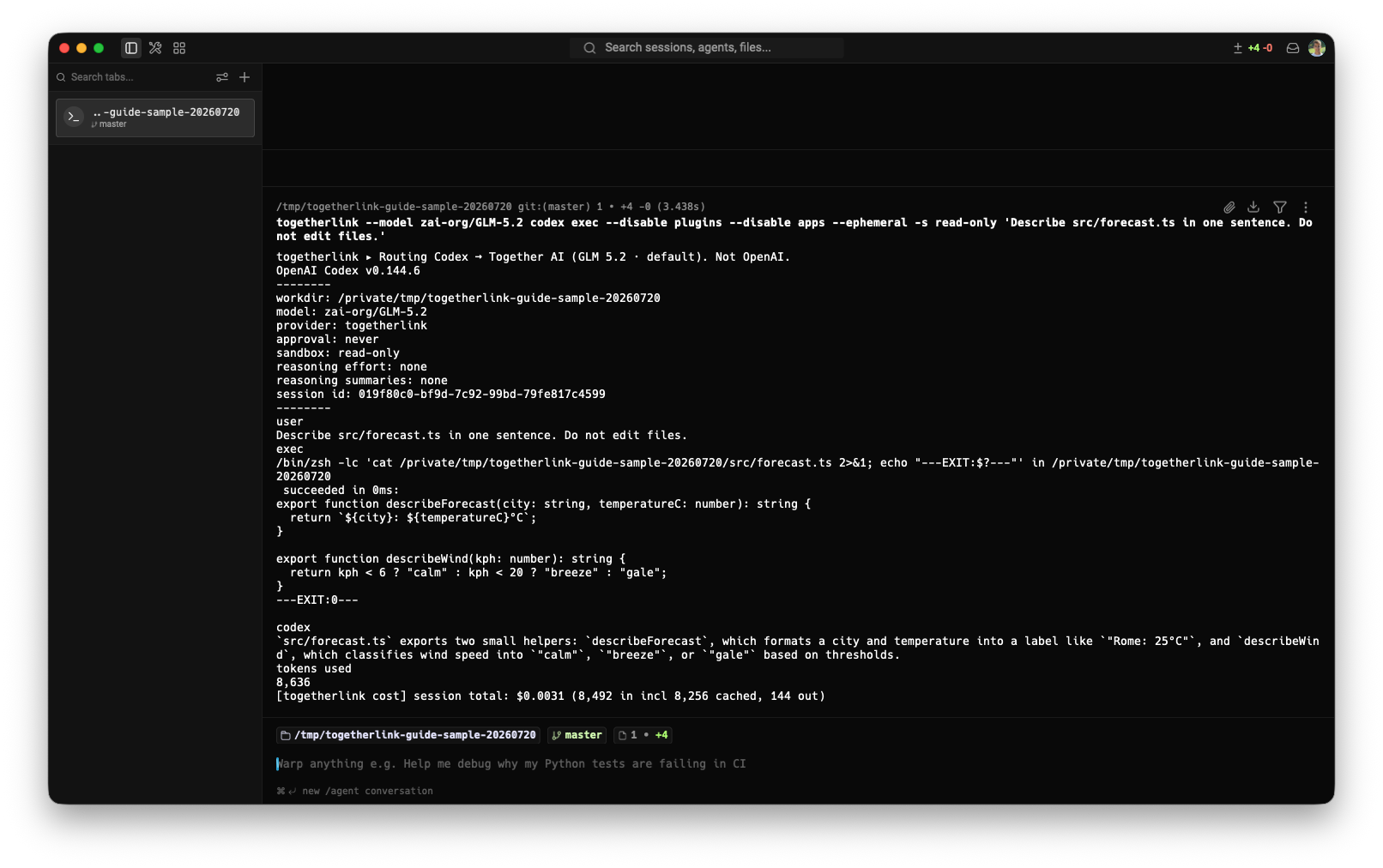
We asked Codex to read one TypeScript file in a small Git repository and describe it without making changes. The startup block shows GLM 5.2 as the model and TogetherLink as the provider.
Use it for a one-shot coding task
Codex's exec mode works through the same TogetherLink proxy. Run it from the repository you want Codex to inspect. The model flag belongs before codex; everything after codex is passed to the Codex CLI.
togetherlink --model zai-org/GLM-5.2 codex exec "Find and fix the failing test"What TogetherLink changes—and what it does not
For this run
- Starts a local Responses-compatible proxy.
- Injects a temporary Together model catalog.
- Reports the Together AI token cost when the session ends.
Your normal Codex
- Keeps its existing OpenAI login.
- Keeps its saved configuration.
- Uses your normal provider again when launched normally.
If the first run fails
The key is missing or rejected
Run togetherlink configure again and paste a current Together API key. You can also provide TOGETHER_API_KEY in the environment.
The output says provider: openai
Stop the process and relaunch with togetherlink --model zai-org/GLM-5.2 codex. A plain codex command intentionally uses your normal provider.
Codex does not recognize an option
Keep TogetherLink options—such as --model—before codex. Put Codex options—such as exec or -s—after it.
FAQ
Can Codex CLI use GLM 5.2?+
Yes. TogetherLink starts a local OpenAI Responses-compatible proxy, points Codex at it for that run, and forwards the request to GLM 5.2 on Together AI.
Do I need a Together AI API key?+
Yes. The model request runs on Together AI, so you need a Together API key with available credit. Your ChatGPT or OpenAI subscription does not pay for Together inference.
Does TogetherLink replace my normal Codex configuration?+
No. TogetherLink passes a temporary provider and model catalog to the Codex process it launches. Your regular Codex settings and OpenAI login remain in place for normal Codex runs.
How do I know Codex is really using GLM 5.2?+
Check the startup output before sending a prompt. It should show provider togetherlink and model zai-org/GLM-5.2. After the session, TogetherLink also prints the Together AI token usage and cost for completed model requests.
Can I run GLM 5.2 with codex exec?+
Yes. Put the Together model flag before the codex command, then use Codex normally: togetherlink --model zai-org/GLM-5.2 codex exec followed by your prompt.
Does GLM 5.2 support images in this setup?+
GLM 5.2 is text-only in TogetherLink's current model catalog. Choose a vision-capable Together model such as Kimi K3 when your task needs image input.