 togetherlink
Connect Claude Code to GLM 5.2, Kimi, and DeepSeek
Keep the Claude Code terminal experience and route model calls to GLM 5.2, Kimi, DeepSeek, or another curated Together model—without replacing your Claude settings.
By TogetherLink
The short answer
TogetherLink starts a local compatibility proxy for Claude Code. It forwards model requests to Together AI and streams responses back in the format Claude Code expects.
Two tools and one required key
Claude Code
Install it and complete Claude's normal sign-in once.
TogetherLink
Install the local routing binary with the command below.
Together key
Create a Together API key and make sure the account has available credit.
New to Claude Code? Follow Anthropic's official setup guide, then sign in once before launching tclaude.
curl -fsSL https://togetherlink.vercel.app/install.sh | bashtogetherlink configuretclaudetogetherlink --model zai-org/GLM-5.2 claude -p "task"The installer also adds tcodex, tchatgpt, tgrok, thermes, tpi, tprime, tdeepseek, and topencode. Use the full togetherlink claude command in scripts when you want the target tool to be explicit. Put --model before the harness name so TogetherLink consumes it instead of passing it to Claude Code.
| Area | TogetherLink run | Normal Claude Code |
|---|---|---|
| Model endpoint | Local Anthropic-compatible proxy | Anthropic |
| Model billing | Together API account | Your Anthropic plan |
| Claude login | Preserved | Preserved |
| Saved settings | Not rewritten | Used normally |
| File and shell tools | Run by Claude Code | Run by Claude Code |
Claude Code reading a sample repository
This non-interactive run asked Claude Code to inspect a TypeScript file without editing it. The TogetherLink banner shows that Claude Code was configured to use GLM 5.2 on Together AI rather than Anthropic.
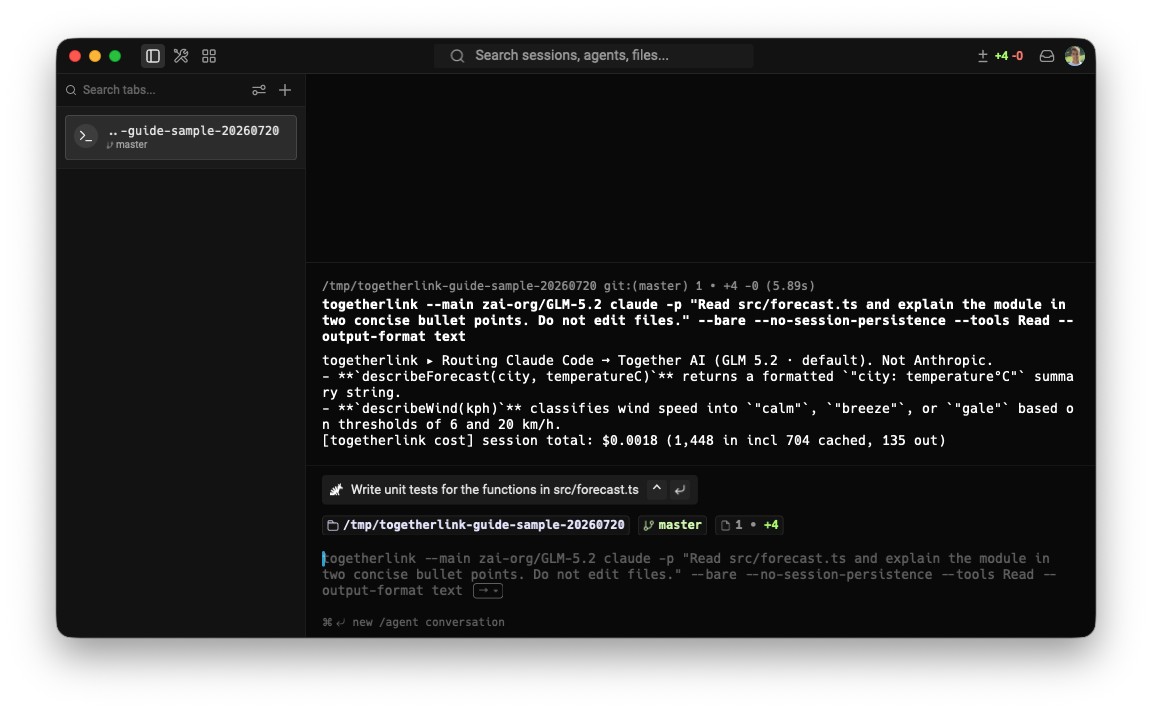
Web search is a separate, optional key
Claude Code's model calls use Together. If a Claude workflow invokes web search, TogetherLink can emulate that tool with Exa. Add an Exa key during togetherlink configure only when you want that feature; it is not required for repository work, shell commands, or file edits.
Verify the provider before trusting the result
At startup, read the line printed before Claude Code opens. With the default model, it should say:
togetherlink ▸ Routing Claude Code → Together AI (Kimi K3). Not Anthropic.
If you do not see that line, stop and check that you launched togetherlink claude or tclaude, not plain claude.
Switch models after the first Claude run
Start with tclaude. For an override, TogetherLink options go before claude, while Claude Code arguments go after it.
togetherlink --model deepseek-ai/DeepSeek-V4-Pro-0813 claudetogetherlink --model zai-org/GLM-5.2 claude -p "Summarize the current diff"moonshotai/Kimi-K3Default · vision · reasoning · 1M context
zai-org/GLM-5.2text · reasoning · 512K context
deepseek-ai/DeepSeek-V4-Pro-0813text · reasoning · 1M context
Qwen/Qwen3.7-Maxvision · reasoning · 1M context
deepseek-ai/DeepSeek-V4-Flash-0731text · reasoning · 1M context
togetherlink --model MODEL claude -p "..."togetherlink claude --model MODELFAQ
Can Claude Code run Together AI models?+
Yes. TogetherLink launches Claude Code against a local Anthropic Messages-compatible proxy, then sends each request to the selected Together AI model.
Do I still need Claude Code installed?+
Yes. TogetherLink is a routing layer, not a replacement interface. Install and sign in to Claude Code normally, then launch it through togetherlink or the tclaude shortcut.
Will TogetherLink log me out of Claude Code?+
No. The Together provider is injected only for the launched process. Your Claude Code login and normal settings remain available when you launch Claude Code normally.
Why do I need a Together API key if I pay for Claude?+
Your Claude plan covers Claude usage provided through Anthropic; it does not pay for model calls made through Together AI. Together requires its own API key and bills those model tokens separately.
Do I need an Exa API key?+
Only if you want TogetherLink's Claude web-search emulation. The Together key covers model requests, while Claude Code runs file and shell tools locally. Neither requires an Exa key.
How do I change the Together model used by Claude Code?+
Place --model and the exact Together model ID before claude. For example: togetherlink --model deepseek-ai/DeepSeek-V4-Pro-0813 claude.
Can I use Claude Code's non-interactive -p mode?+
Yes. Arguments after claude go to Claude Code, so togetherlink --model zai-org/GLM-5.2 claude -p followed by a prompt uses the same local proxy.